Configuring CygNet Message Options
The ODBC driver has three options: Warnings, Edit Warnings, and Force Updates. The Warnings option specifies that generic warnings regarding the driver are displayed. The Edit Warnings option determines that warnings are shown when a user edits a record. The Force Updates option determines whether or not a user is prevented from making changes while another user is already in the process of making changes.
To enable or disable the CygNet Message Options, you have three options.
Option 1: Modify the Oasql.ini File
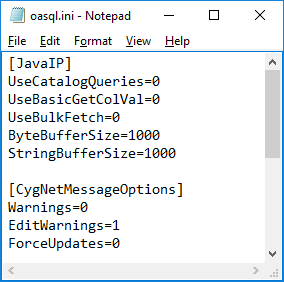
Edit the Oasql.ini file located in the CygNet\Support\ODBC folder.
|
| Sample CygNet Message Options File |
| CygNetMessageOptions | Description |
|---|---|
|
Warnings |
Enables or disables CygNet communication warning messages. Examples of a warning message include:
Options are:
The default value is 0. |
|
EditWarnings |
Enables or disables update row or delete row warning messages. Note than when updating numerous records, if enabled, this feature results in a warning for each record. For example, 600 record updates would result in 600 edit warning messages. Options are:
The default value is 1. |
|
ForceUpdates |
Enables or disables forcing updates and deletes to DBS. If disabled, any user in the process of editing the data will not be interrupted by your update query. Options are:
The default value is 0. |
Option 2: Modify Message Options in the ODBC Property Sheet
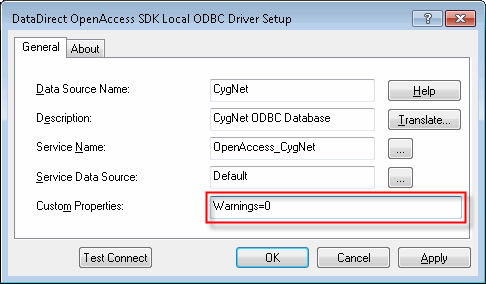
Edit message options in the ODBC property sheet. Any message setting you make in the property sheet overrides the file value.
|
| Sample ODBC Driver Setup |
Option 3: Modify Message Options by Using Script
Edit message options by using script. Any message setting you make in script overrides the file value.
|
using (DbConnection conn = new OdbcConnection("DSN=CygNet;ServiceFilter=MYSITE.FAC;Warnings=0")) { conn.Open();
[… …] } |


